![SONGTRUST_ICON.png]](https://help.songtrust.com/hs-fs/hubfs/SONGTRUST_ICON.png?width=40&height=40&name=SONGTRUST_ICON.png)
If a song has:
-
Previously been submitted
-
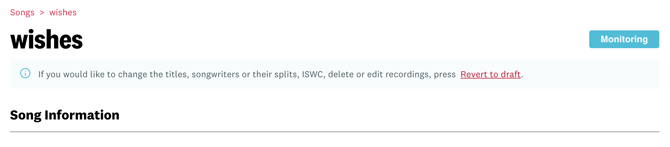
Currently in the Monitoring status
You can edit the song by clicking "Revert to Draft" and then click "Discard Draft".

If the song has already been sent to societies, you may submit a request to our Support team to cancel the song.
A few things to keep in mind when canceling a song:
-
All songs are subject to our post-term collection period.
-
Canceling a song with Songtrust once it has already been sent for registration does not remove the song or our claim automatically from societies. Societies do not remove claims without a new publisher claiming on your behalf as they need somewhere to continue sending any earned royalties.
Thanks for reading. Please rate the article below.
Want to keep up with Songtrust for frequent music and publishing updates?
Follow us @songtrust
Subscribe to our Newsletter
Visit the Songtrust Blog